This is default featured slide 1 title

Go to Blogger edit html and find these sentences.Now replace these sentences with your own descriptions.This theme is Bloggerized by Lasantha Bandara - Premiumbloggertemplates.com.

This is default featured slide 2 title

Go to Blogger edit html and find these sentences.Now replace these sentences with your own descriptions.This theme is Bloggerized by Lasantha Bandara - Premiumbloggertemplates.com.

This is default featured slide 3 title

Go to Blogger edit html and find these sentences.Now replace these sentences with your own descriptions.This theme is Bloggerized by Lasantha Bandara - Premiumbloggertemplates.com.

This is default featured slide 4 title

Go to Blogger edit html and find these sentences.Now replace these sentences with your own descriptions.This theme is Bloggerized by Lasantha Bandara - Premiumbloggertemplates.com.

This is default featured slide 5 title

Go to Blogger edit html and find these sentences.Now replace these sentences with your own descriptions.This theme is Bloggerized by Lasantha Bandara - Premiumbloggertemplates.com.

Showing posts with label Adsense. Show all posts

Sunday, December 25, 2011

Aku Dan Google Adsense

Aku Dan Google Adsense. Kali ini saya mau bercerita tentang pengalaman adsense dari pertama hingga akhir!!

Sudah 7 bulan lamanya saya menjadi publisher google adsense, bisnis online terbesar dan no 1 di dunia, (gax tau dehh kalo menurut sobat sobat blogger)!. Pertama kali saya bikin google adsense itu cuman iseng aja, dan itu juga saya di daftarin oleh seorang temen, sebut saja kang Dadang! Pertama pas awal awal bikin akun GA pengetahuan tentang PPC ini masih sangat minim banget alias masih newbie. Bahkan peraturan aja belum faham. Tapi yang setau saya jangan suka ngeklik iklan sendiri pake IP address yang sama, nahh itu aja yang saya tau. Daftar akun GA pertama itu lewat indyarocks kalo nggak salah! Tepat tanggal 9 mei akun pertama diterima!

Ceritanya habis di approve, langsung pasang iklan di blog bahasa inggris. Saya update artikel di blog langsung copas artikel inggris yang masih hot! Nahhh disini saya belum faham sama yang namanya visitor atau pengunjung!  lalu terlintas di pikiran saya, "Saya itu kan internetan pake modem AHA trus IP address nya juga dinamis alias ber ubah ubah! langsung dehh saya beraksi gak pake panjang mikir, nge klik iklan sendiri, visitor saya sendiri! kalo ada pengunjung juga gimana bisa berkunjung kalo alamat blog saya aja belum di masukin ke search engine! hahah.... tiap hari saya ng klik 30-40 klik iklan adsense milik saya tiap hari! jadi cara kerjanya gini, menit pertama saya klik iklan trus modem di disconnect dulu, di diamkan selama 2 menitan trus saya konekin lagi! sambil melakukan kegiatan tsb saya catat no IP addressnya dan ternyata bener no IP nya gonta ganti! wkwkwkwk..... saya hampir tiap hari ngelakuin kaya gitu! lama lama saya bosen pake modem, trus saya cari warnet yang 5 menit pertamanya murah, yaa skitar 500 rupiah lahh! kadang juga ada yang gratis 10 mnit pertamanya! wakkakakak... biasanya kalo lagy kosong saya boking 6 PC, trus saya buka blog langsung di hajar iklannya! :D

Sudah 3 minggu berlalu, trus saya penasaran sama penghasilannya! saya cek ternyata baru dapet 50$! jeheheheh.... lumayan donk hasil klik iklan sendiri!. habis ngecek akun besoknya langsung saya buka email Akun GA, niatnya cuman pengen ngirim email tugas kuliah! tapi ternyata saya malah dapet surat cinta yang sangat MENGERIKAN dari mbah google! pas saya buka ada tulisan "Selamat akun anda berhasil dinonaktifkan"... seketika badan saya langsung gemetar + lemas! nahhh itu lahh cerita pas awal awal punya akun adsense...
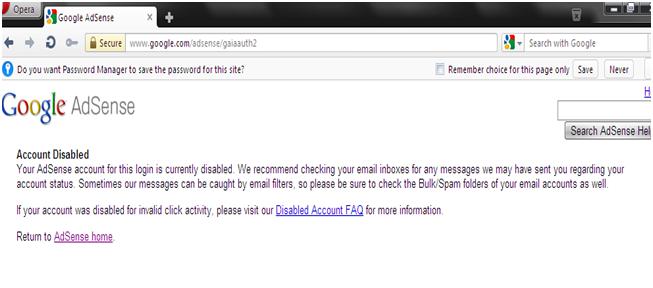
Banned Pertama
Cerita kedua nihhh..... abis di talak google, saya nggax nyerah gitu aja, saya nyari informasi seputar google adsense, sharing sharing sama para mastah GA! abis seminggu di baned alhamdulilah saya diterima lagi jadi publisher GA, daftar lewat docstoc cuman nyumbang 5 document langsung diterima! pengetahuan saya pun bertambah setelah insiden baned yang pertama! ahihihihihi..... ya alhamdulilah akun adsense yang kedua bisa menghasilkan alias cair! ini bukti gajih nya sob :
Bukti Gajih Adsense

Setelah saya punya akun yang kedua,  tepatnya sebulan sebelum yang ke dua cair saya bkin lagi akun GA yang ketiga, tembus lagi pake docstoc! Hihihih…..
Tepat tanggal 7 september 2011, 2 akun saya dibaned! Gara2 sering bertukar kiss pake opera turbo. Tapi saya masih beruntung dapet PO gede dari si mbah google! 10 hari kemudian saya nyoba daftar lagi dan alhasil 2 akun adsense yang baru di approve lagi Hahaha…. Untuk jaga jaga kalo di baned lagi saya lgsung mesen 1 akun adsense baru ke jasa pembuatan adsense. Emank nasib, 2 akun yang baru di razia lagi sama si mbah! Nggax tau dehh alasannya kenapa. Udah 6 akun adsense saya di baned semua, tinggal nyisa 1 lagi, saya pasang di blog kesayangan yang ini, tiap hari posting artikel yang baru trus blogwalking bwt nambah visitor! Segala cara udah saya lakuin dari hasil postingan yang tidak terlalu copas dan tuker kiss atau tuker klik ke sesama publisher. Pokoknya main jujur lahh, sampe sampe penghasilan adsense pun kecil banget, ini screenshotnya :
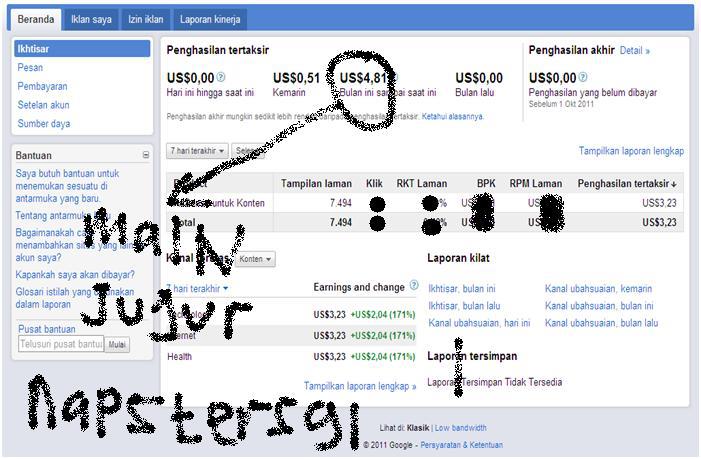
Pendapatan Adsense

Sebulan setengah saya maen jujur, ternyata ehh ternyata akun yang terakhir ini malah di baned lagi. Dari sini saya mulai pusing. Kok bisa ya, maen jujur aja di baned apalagi maen curang! Wakakakaka….. ya udah dehh, mungkin tahun depan daftar lagi! Untuk sementara sekarang saya vakum dulu dari dunia google adsense! dah cape di baned terus, mana semua nama udah di daftarin, bingung juga nih kalo mau daftar!
Sekian dulu nihh postingannya!

Buat sobat sobat ambil sisi positifnya dari cerita saya diatas. Mudah mudahan bermanfaat!.

Saturday, August 13, 2011

Register a Adsense Account Through Intermediary Sites such as

Register a Google Adsense account through intermediary sites such as Docstoc, Hubpages, etc.
Can you register a Google Adsense account without having to have a website or blog? You can totally do it.

1. General rules when registering though intermediary sites

Google Adsense allows implementing a profit-share program among members and sites.
When users click on ads of Google Adsense on other websites that you register, the profit-share will be on basis of 50/50.
Mostly, registration on these websites is easy; however, you still have to post or upload documents of your own copyright.
How long will you be accepted?
  • If you are from the U.S, Canada or Europe, you will be accepted after just a few days.
  • If you are not, be patient and wait for 2-3 months before successful registration. You have to gain a certain number of posts or uploaded files (10-20) and continue to post and upload steadily during the registration period.
Note that you can’t use this account to create an Adsense Code and add them on your sites/blogs. If you want to add, you have to go to Adsense Setup/Channels/URL channels. Then enter the sites you want to add the code in and wait for Google’s approval.

2. Register Google Adsense account though Docstoc

Step 1: Register for a free account at www.docstoc.com
Step 2: Docstoc will ask if you want to create a Google Adsense account or not, tick “I’d like to set up an   Adsense account”. You may be able to create a Google Adsense account after signing in your docstoc account.
Step 3: Docstoc will send you an email to activate the account
Step 4: You now can upload files and share with others. If you haven’t created an Adsense account yet, you can create one in this step. Note that the Adsense account will only count the uploaded files after the registration but not before.
For how long will the Adsense account be accepted? You need to upload frequently for 1-3 months before registration. If you have uploaded many other files before, the acceptance time may be within 1 week.
Docstoc shares the revenue on basis of 50/50. Like making money from Adsense though other methods, you are not allowed to upload copyright violated documents.

3. Register a Google Adsense account though Hubpages

Hubpages is a website that allows you to make money with Adsense, Amazon, or eBay from your posts on Hubpages.

Step 1: Go to www.Hubpages.com
Step 2: Register an account on Hubpages. Activate the account when activation email is sent to your email address.
Step 3: Write posts to Hubpages. Post a certain and frequent number of articles for your Adsense account to be accepted. These posts must not violate any copyright. You should focus on posting on a certain subject.
Create a Google Adsense account linking to your webpage. Ads will appear on Hubpages and increase your chance of making money from your webs.
Step 4: Register an Adsense account on basis of your Hubpages account.

4. Register a Google Adsense account through Flixya

Flixya shares 100% of the revenue which means you will get 100% the money gained from your ads. You can add your current Google Adsense or open a new Adsense account.

Step 1: Go to www.flixya.com and click “Sign Up”, fill in details, and click “Start Now”.

Step 2: In this step, Flixya will ask if you already have a Google Adsense account or not. You may select “No” and fill in your email address to start registering a Google Adsense account.
You may skip this step and check email then set up this later.

Step 3: Flixya will send an email to activate your account

Step 4: Staring writing blog. You may upload images, embed videos from YouTube, etc. and remember that all your posts, images, videos, etc. must not violate any copyright.